- Home
- Business Bookkeeping Software
- Switching from Excel to Software
switching from excel to software: what you need for a clean, confident handoff
You don’t need perfect books to switch from Excel to software for your bookkeeping. You need enough reliable information to be ready for the handoff: usable starting data, supporting records to verify the data, and a clean switchover date you can manage.
With those three parts in place, you can switch confidently, then improve the rest over time in a more stable system.
Table of Contents
- What it means to be ready enough to switch
- What needs to go into your new software
- What to fix before you switch
- How to choose a switch date you can manage
- The documents to keep for the handoff
- Use a "ready-enough" checklist before you commit
- You can clean up the past without holding up the future
- Frequently asked questions
what it means to be ready enough to switch
Being ready doesn’t mean having a perfect spreadsheet. It means establishing a reliable starting point so you can get going in your choice of software without a huge delay.
The minimum elements to focus on for a successful switch
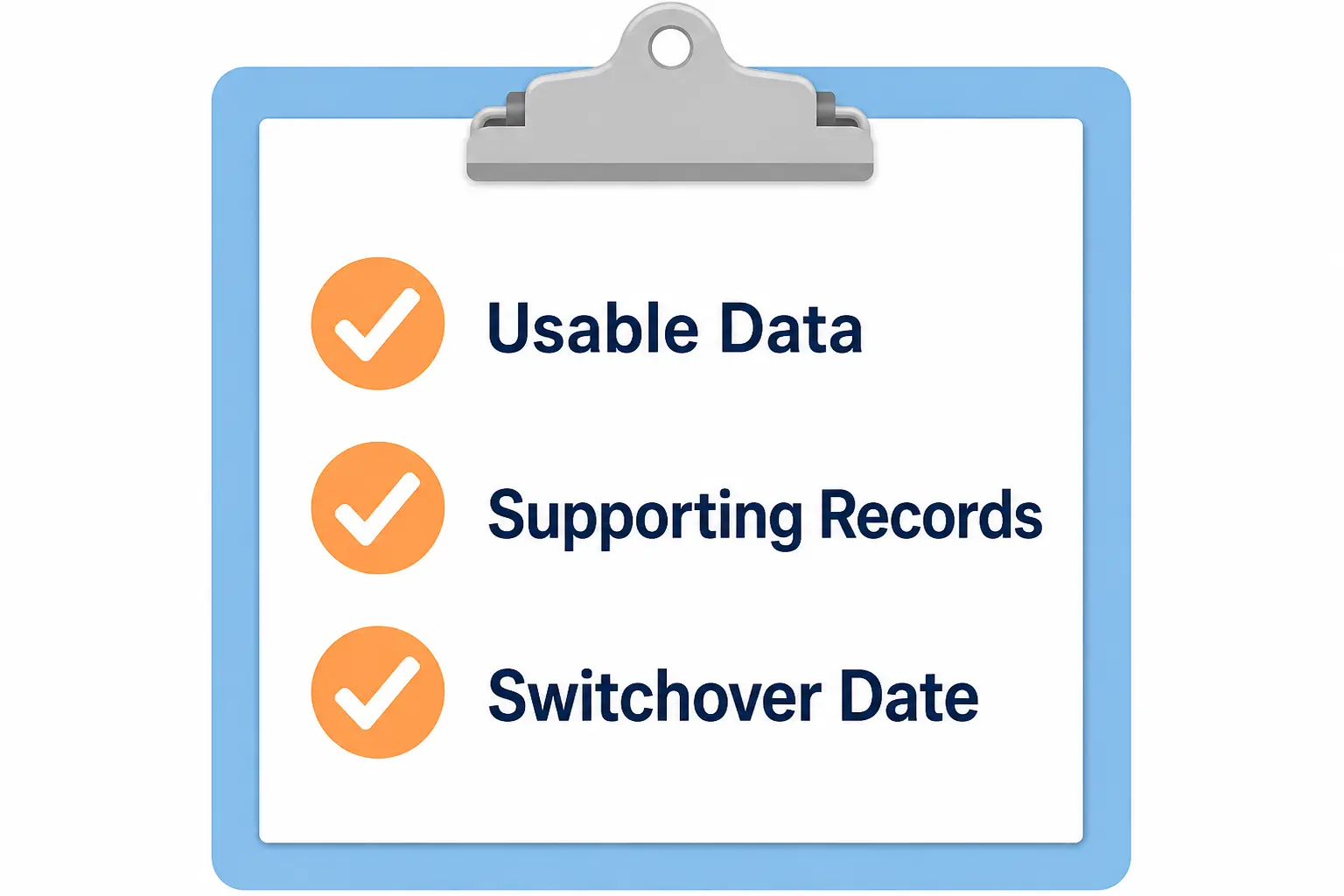
To be ready enough for a switch, you need to have three main components in place:
- Usable Data: Starting balances you are sure of, transactions you can categorize
- Supporting Records: Documents that back up the balances and transactions
- Switchover Date: One day of the year where Excel is the archive and the software is your active bookkeeping data – this date is also called a conversion date.
Why perfect books are not the requirement
The plan isn’t to recreate the entire spreadsheet inside the software, so it doesn’t need to be immaculate.
You won’t be moving Excel formatting, formulas or reports into the software.
You will be using opening balances and account categories for your chart of accounts.
If your Excel bookkeeping is too messy to rely on, you have the option of redoing your current year reconciliations in the software.
Understanding starting balances
The starting or opening balances are known as conversion balances. They are taken from the closing balances from the day before.
Conversion balances provide a continuation of your business totals even though the underlying transactions aren’t in the software.
These totals are usually found in account category totals on a trial balance, a balance sheet, an income statement (profit and loss report).
what needs to go into your new software
In your software, connect your banks and select the date from which to bring in transactions (you can go back several months if you are going to reconcile historical income and expenses). Next, focus on your account category names and your starting balances.
Categories, account names, and naming cleanup
Bring over account categories you are familiar with but tidy them up first:
- Replace generic names (Misc 1) with easy to identify names.
- Merge similarly named accounts or double-ups (Meals vs Meal)
- Group similar items into one (Pens, Ink, Paper into Stationery)
Your software has an existing and editable chart of accounts (rename/delete/add new) which you can build out using your spreadsheet categories as a reference.
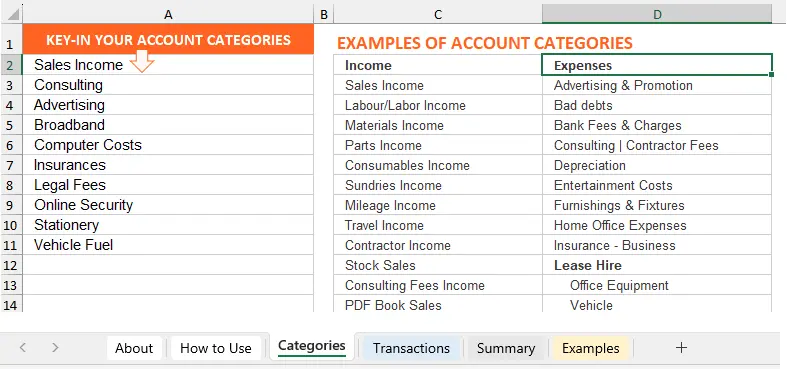
Or develop a fresh categories list in a new Excel sheet. This can be converted into a CSV document to be imported directly into the software using their instructions, like these from Xero.
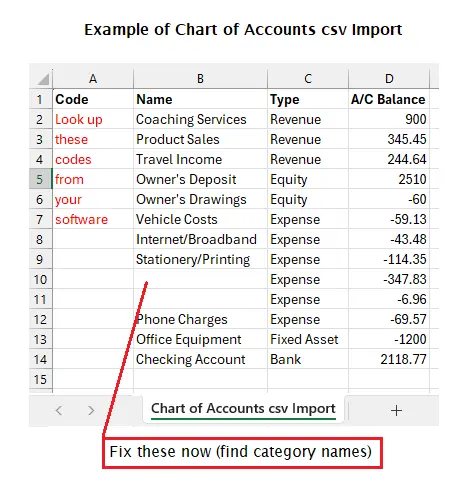 A CSV snapshot of account categories including account balances which can also be imported at the same time.
the starting balances to bring in
Get these from your category totals, balance sheet or documents:
- Opening bank, credit card and loan balances.
- Total bills you still have to pay – to record as opening payables.
- Total invoices owed to you – to record as opening receivables.
- Sales tax rates and payments due, if this applies.
When to bring over income and expense history
Here are pathways to help you decide:
Your start date is the start of your financial year
There is no need for income and expense history or income and expense opening balances (you are only focusing on balance sheet balances)
Your start date is the start of financial year, but it is now several months into the year
Enter current opening balances for the income and expenses (off your reconciled Excel books), or if your Excel is too messy to get reliable balances, bring in the income and expense transactions from the start of the financial year to current date and reconcile those transactions (this is a more time-consuming option)
Transactions are missing because your bank feeds started later than expected
Import the missing transactions
what to fix before you switch
Don’t get trapped into thinking you have to fix your entire spreadsheet before you are allowed to upgrade.
Not every spreadsheet problem needs fixing before switching
Don’t waste costly time trying to sort things that have no bearing on your actual numbers.
Ignore messy formatting or clunky formulas that you ‘always meant to update’.
Archive your arbitrary scratch calculations or rough planning and forecasting ideas, or old and messy data from prior years.
The problems to fix before switching
If you will rely heavily on your Excel balances to start your software, the following should be finalized:
- reconcile your bank balance up to the date of switching
- separate personal from business expenses
- know what your outstanding invoices or bills are at the switchover date
- establish your sales tax reporting figures
- is it clear what date period the spreadsheet covers?
Finally, if you will import a CSV Chart of Accounts to the software, make sure there are no missing details. Here is a helpful article by QuickBooks.
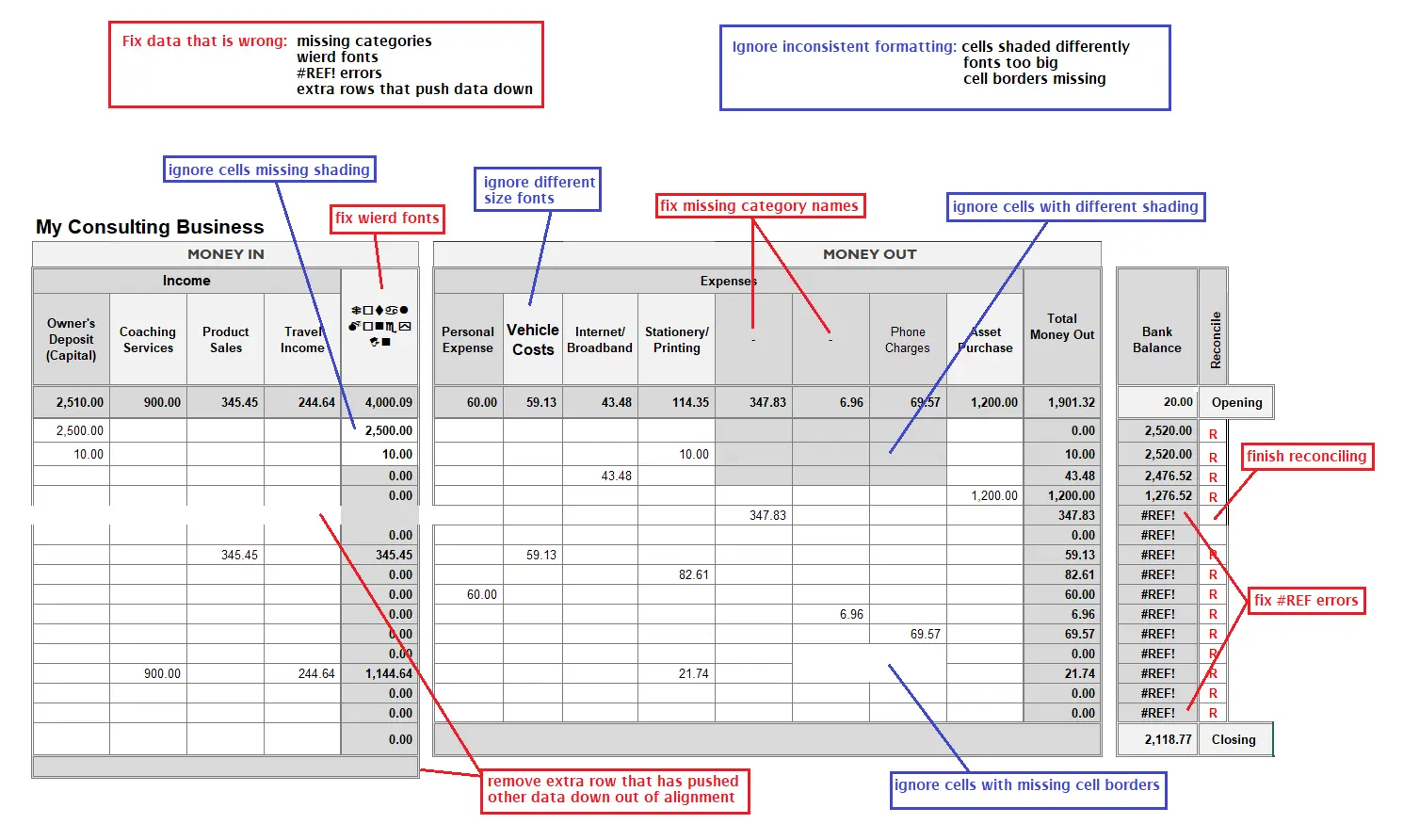
the mess in Excel you can fix later...
...if you have good reason to:
- old transactions in less than perfect categories
- inconsistent historical descriptions
- old accounts and categories that could be reorganized
- transactions from previous period that could be better classified
- old spreadsheet formatting
- information that would be useful but isn’t essential to operate going forward
how to choose a switch date you can manage
why the conversion date matters
Choosing a firm date to switch gives you one system to maintain (the software) and the other one to archive and use as a reference (Excel).
The date will either be:
- in the future (first day of next month or next financial year)
- or you might decide to select one in the past (any of the recent months gone by or start of this financial year)
The goal: from the switch date, you will no longer categorize and reconcile transactions in Excel, but only in the software.
best times to switch for a small business owner
In bookkeeping ‘clean’ cutoff dates usually start on the first day of a month or after a finalized tax cycle.
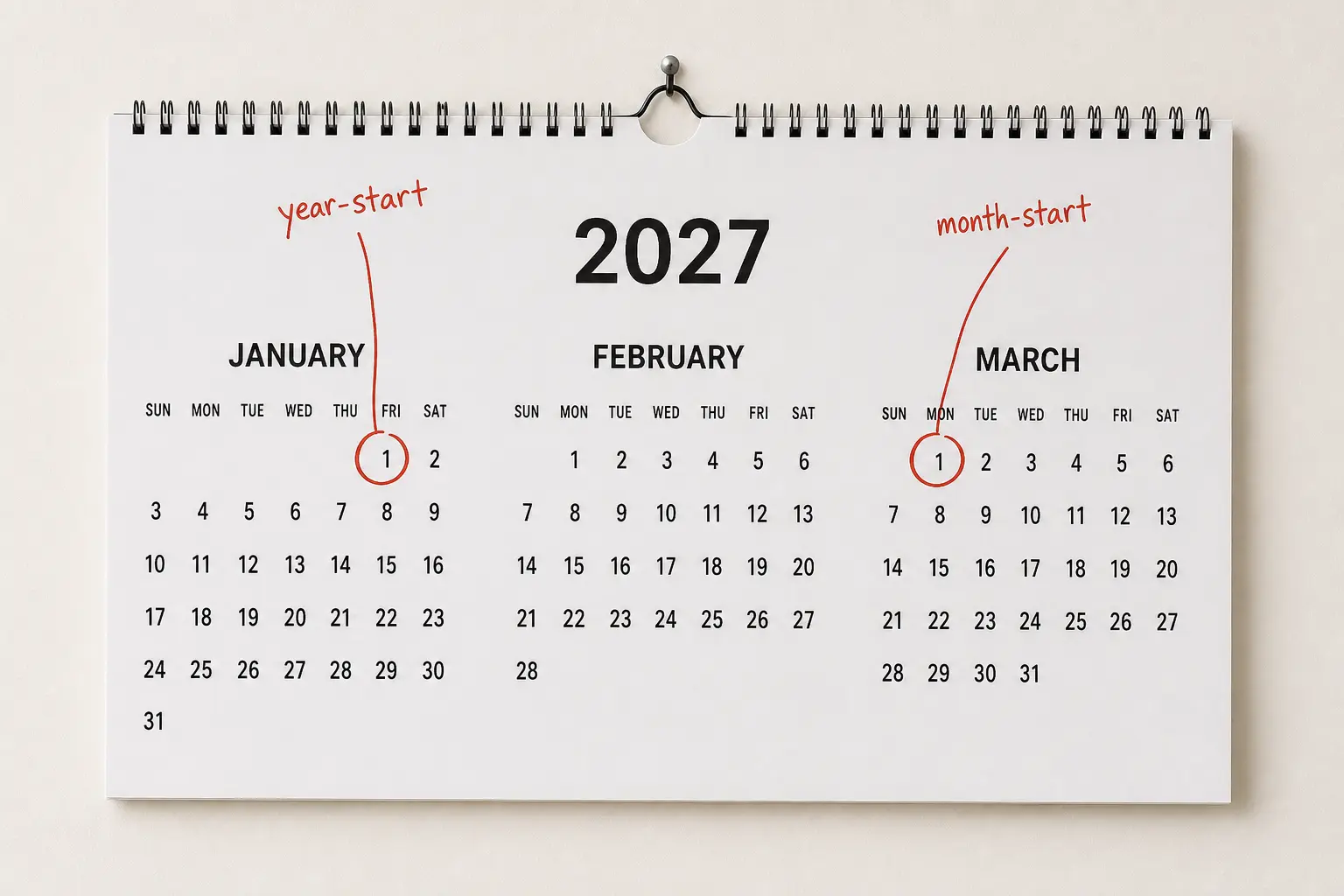
The start of the new financial year: this can be the simplest switchover date because you usually only need opening balances. Example, January 1
The first day of a month during the financial year: this may work better if it’s in a quieter season giving you more time to action the change. Example, March 1
The first day of a new sales tax cycle: this prevents you having to deal with split reporting from two different systems in a cycle.
These clean dates make reporting and reconciliation simpler.
when not to switch
You can change to software whenever it suits you, there are no rules about it, but it is good to identify a quieter period and avoid switching:
- during your busiest days or sales season when your attention is taken elsewhere
- right before an important deadline, like tax filing, if you will panic and abandon the switch
the documents to keep for the Handoff
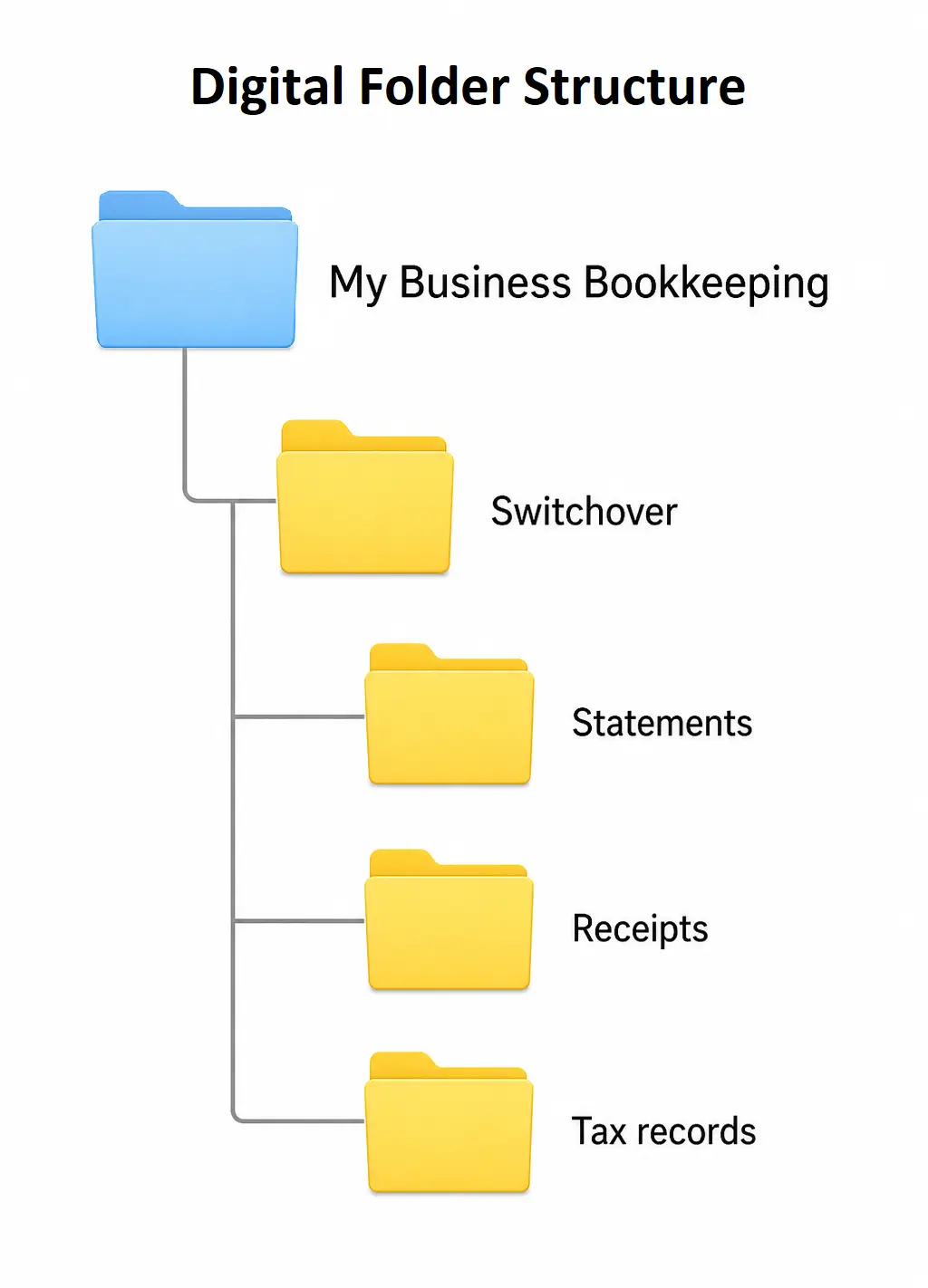
These records are used to verify balances and starting data in your new system. Keep them in an organized filing system – open a ‘Switchover’ file for that date.
documents for the opening balances
Gather these source documents to support the opening balances and details covering the date your new software starts:
- bank statements for each bank account
- credit card statements for each card
- loan statements and schedule of payments for all loans
- all the unpaid sales invoices and bills
- a list of account categories that you will use
documents for income and expense transactions
For the history of transactions you are importing, you don’t need to have receipts for every small purchase (like coffee), but you should have receipts or invoices for large purchases and assets (equipment or vehicles), important travel and meals, and anything you think can be questioned later.
You probably have these already somewhere in your bookkeeping filing system.
documents for tax, payroll and sales records
If relevant, gather:
- prior year return and schedules
- payroll summaries and filings
- sales tax filings and reports
- contractor payments and details
use a ready-enough checklist before you commit
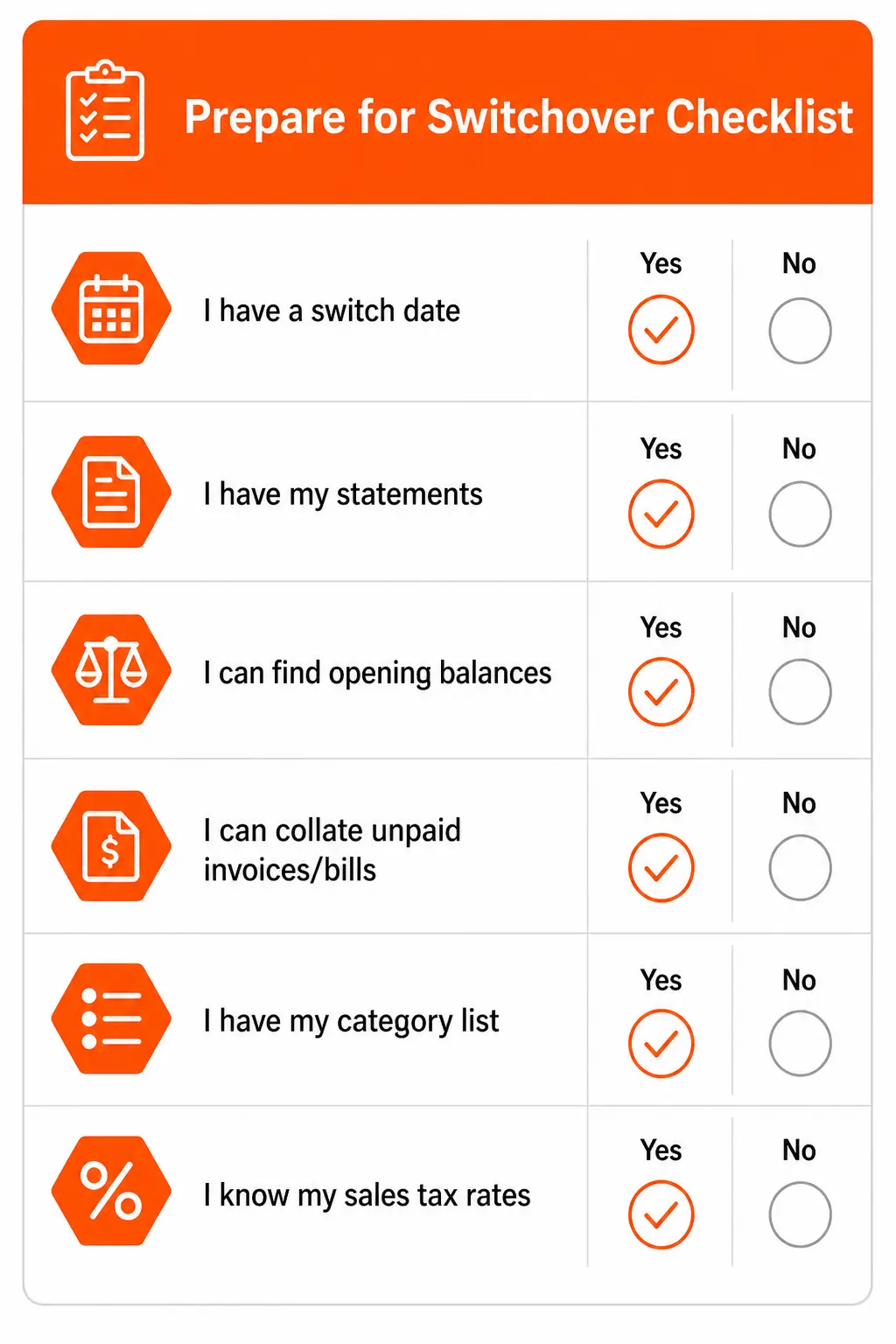
are you "ready-enough" to move to software?
If you can answer these questions, you are ready-enough to move.
- I have decided on my switchover date
- I know how to find my bank and card statements quickly for that date
- I know how to look up my bank and card balances for that date
- I can quickly pull together my open invoices and unpaid bills at that date
- I have a category list I can live with for now
- I know what my sales tax rates are
when to wait a little longer
Wait if you answer no to any of the questions above, and if:
- you cannot find statements
- you have no idea what is owed to you or who you owe
- you are switching to avoid looking at numbers
- you’re still trying to figure whether to import historical transactions
you can clean up the past without holding up the future
You don’t need to hold back use of bookkeeping software whilst sorting your Excel history.
Set your switch date, open a digital folder for switch-related documents, connect your banks and select your start date for the bank feeds.
Then you can start categorizing/reconciling transactions imported automatically via bank feed.
After that, fix up anything that requires it over time:
- updating opening balances
- importing and reconciling historical income and expense transactions
- perfecting your chart of accounts
- archiving your Excel bookkeeping
Common questions About Switching
When is Excel no longer "enough" for bookkeeping?
When is Excel no longer "enough" for bookkeeping?
When volume, errors, or time spent reconciling grows - software becomes safer and faster.
How long does it usually take to switch from Excel to bookkeeping software?
How long does it usually take to switch from Excel to bookkeeping software?
Simple books can switch in days; messy books or lots of history can take weeks.
Do I need to reconcile every past transaction before I switch?
Do I need to reconcile every past transaction before I switch?
No. You can switch, then reconcile the past, then update changed opening balances in the software (which can be done up until you run your first monthly reports). Reconciling Excel may not be necessary at all if you plan to import current year transactions to reconcile in the software.
Do I need an accountant or bookkeeper to help me switch?
Do I need an accountant or bookkeeper to help me switch?
Not always - but it's helpful if you're behind, mixing accounts, or unsure about balances.
Should I move all my spreadsheet history into the new software?
Should I move all my spreadsheet history into the new software?
No. Opening/conversion balances are enough for the switch.
Is it better to switch at month-end or year-end?
Is it better to switch at month-end or year-end?
Month start is simplest. Year start is clean if you are not under deadline pressure.
What if my categories in Excel are inconsistent?
What if my categories in Excel are inconsistent?
Pick a simple set now and commit. You can refine the categories later once the system is stable.
Can I keep using Excel for some parts of bookkeeping after I switch?
Can I keep using Excel for some parts of bookkeeping after I switch?
Yes, many keep budgets or custom analysis in Excel while bookkeeping lives in software.
What's the biggest mistake people make when moving from Excel to software?
What's the biggest mistake people make when moving from Excel to software?
Importing messy history and assuming the software will "clean it up automatically".
Will switching to software change cash basis vs accrual reporting?
Will switching to software change cash basis vs accrual reporting?
The method is a setting/reporting choice; switching tools doesn't force a method change.
Can I switch gradually, or does it have to be all at once?
Can I switch gradually, or does it have to be all at once?
Gradual can work, but you must avoid double entering the same data in two different systems.
What's the simplest "starter setup" inside bookkeeping software for a beginner?
What's the simplest "starter setup" inside bookkeeping software for a beginner?
Bank feeds (optional), a clean Chart of Accounts, and a simple monthly routine.

Sarah Booysen is a certified bookkeeper who helps first-time business owners, freelancers, sole proprietors, and club treasurers get bookkeeping set up in Excel and stay on top of the day-to-day. Across 26 years in accounts and bookkeeping, she has supported around 20 clients, worked for 3 employers, and created the Excel Cash Book and templates downloaded thousands of times. She still thinks of the kind bookkeeper who first showed her a simple cashbook.

Got Questions or Want to Leave a Comment?
Contact Me
Track your income and expenses in the Cash Book template, and instantly know your profit.
Latest Posts


-
Switching from Excel to Software: Guide for a Confident Handoff
 Switching from Excel to software doesn't have to be delayed by imperfect books. Choose a date and gather your usable data + supporting records for a clean handoff.
 -
Accounts Receivable Definition Including Examples
 Accounts Receivable definition: the total of unpaid sales invoices held in a category called Accounts Receivable in the Assets section of a balance sheet.
 -
10 End of Year Bookkeeping Tips
 10 end of year bookkeeping tips to get ready for tax: 1) When to do these checks, 2) Reconcile the bank, 3) Enter expenses paid with personal money, 4) Check your...