- Home
- Double Entry Bookkeeping
- General Ledger Accounts
General Ledger Accounts
General ledger accounts are found in the general ledger of a business.
The accounts are the place where all the financial transactions of a business are contained.
A business can have as few as 5 accounts ledgers and a large business can end up with 100’s of accounts ledgers.
General ledger accounts are the same accounts as those found on a chart of accounts.
The chart of accounts is the place where general ledger accounts are created and maintained.

Without a chart of accounts, the general ledger accounts could not exist because the ledgers would have no place from which to get their account names or numbers.
The term “general ledger accounts” is often shortened to “GL accounts” when bookkeepers and accountants speak of them.
what are the general ledger accounts?
The accounts are grouped into five main categories:
- Assets
- Liabilities
- Equity
- Income
- Expenses
Each account within those categories contains a ledger and that ledger lists, usually in date order, all the transactions (money received or paid out) specific to that account.
I have prepared more information about the bookkeeping ledgers which shows how the ledgers are split into debits and credits.

general ledger accounts example
In bookkeeping software, to view a general ledger with its all its accounts you must pull up a “general ledger report”.
The general ledger report is accessed by going to the “reports” menu as in this example of QuickBooks Online:
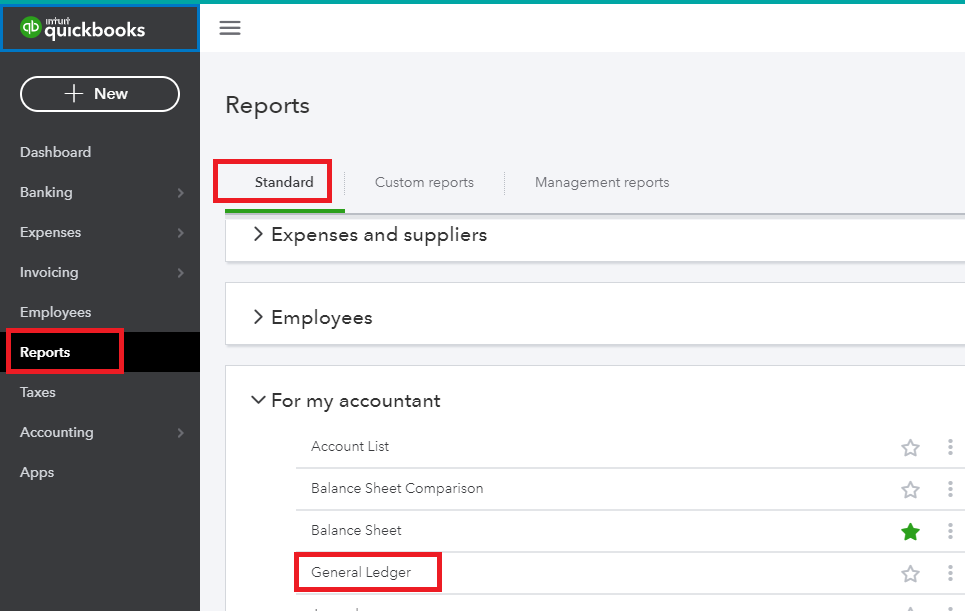 Reports Menu QuickBooks
The general ledger report displays a list of general ledger accounts with these details in columns:
- The name and/or number of the account
- The starting balance
- The debit entries
- The credit entries
- The difference between the debits and credits or the ending balance
And these are all shown in a date range of your choice.
The general ledger report can be displayed in 2 ways:
- as a summary showing a list of accounts with their balances which would normally take up just a few pages or less,
- or as a detailed list showing each account as a heading and then every financial transaction entry for each account underneath; this can be a very big, long report going on to many pages.
The GL report can display the accounts alphabetically or in the order of Assets down to Expenses.
In a summary report it is possible to get to all the transactions within an account ledger by clicking on the account name.
Below is a general ledger summary example from Xero’s Demo Company:
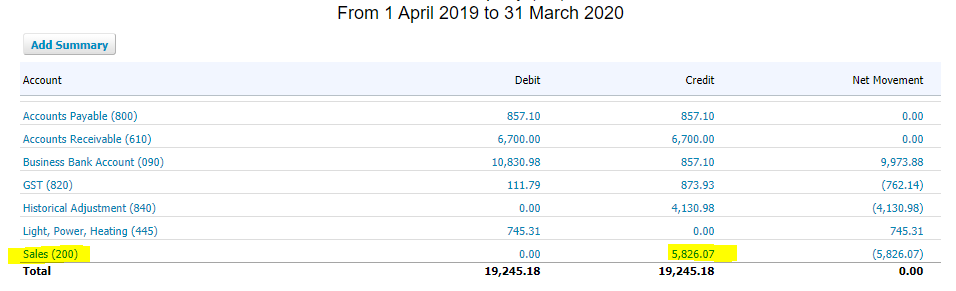 General ledger accounts summary from Xero
I’ve highlighted Sales in the example because when I click on it, I access the full bookkeeping ledger for Sales which looks like this:
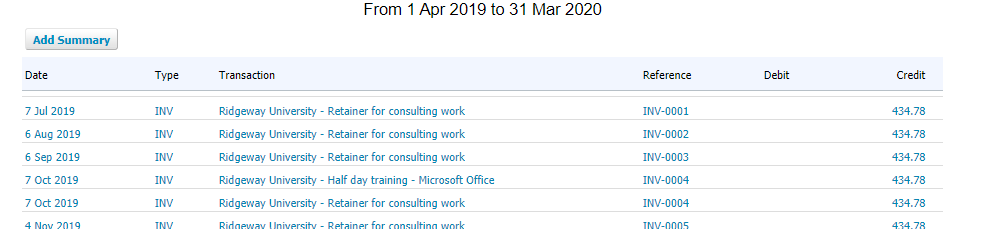 Ledger account for Sales
In the sales ledger I can ‘drill’ down into each sales invoice.
The general ledger accounts report does not show accounts with 0.00 balances unlike a chart of accounts which shows every single account.
the general ledger and T accounts
Moving away from software into a manual bookkeeping system, you would simply flip pages to the relevant ledger sheet/s.
The old manual method of displaying a ledger account is in a ‘T’ format which puts the debits on the left side of the T and the credits on the right side.
Here is an example of a sales ledger using the T format - I've made the "T" orange so you can see it clearly.
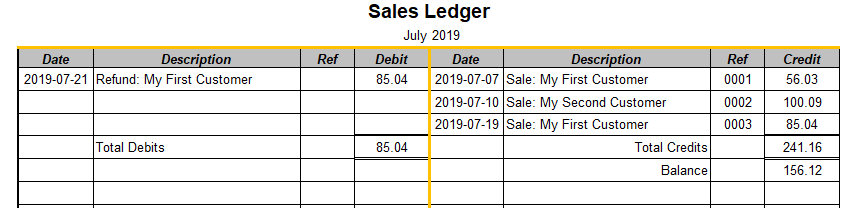 General Ledger Accounts T Format
All the sales are on the right side which means these are all transactions that increase the balance of the sales ledger account, this is a good thing because it means the business is earning money from sales.
When a refund is issued to a customer, the amount is entered to the left side of the ledger as a debit which decreases the balance.
You can read debits and credits to learn more about how these work.
how bookkeepers use general ledger accounts
- To record payments received or paid out, into account categories (through journals and bank entries)
- To verify account balances (through reconciliations)
- To balance the books (a trial balance is handy for checking this)
- To prepare reports
- Sometimes the general ledger accounts may have to be trawled through to find an entry that appears to be missing but was probably posted to the wrong account.
When using software a bookkeeper may also print a full detailed ledger of accounts to PDF format once a month and save it to an online filing system as a precaution in case the bookkeeping software stops working or you lose permanent access for some reason.
The PDF is available as a backup document showing all the general ledger account balances and details which can be useful for starting up fresh in new software.
Also, a detailed general ledger may be requested by an auditor should the accounts ever be audited.

Got Questions or Want to Leave a Comment?
Contact Me
Track your income and expenses in our free Excel Template, and instantly know your profit.
Latest Posts


-
10 Free Bookkeeping Courses to Understand Business Accounts
 These are the best free bookkeeping courses online for anyone in business who must understand business accounts. Learn the bookkeeping language, how to balance the books, how to manage finances, doubl…
 -
Accounts Receivable Journal Entries
 Accounts receivable journal entries: Debit Accounts Receivable, Credit Sales Income, and see other journals for sales returns, discounts, interest and write-offs.
 -
Accounts Receivable Procedures Step by Step
 7 accounts receivable procedures to manage credit sales effectively. Learn the best practices for invoicing, payment collection, and maintaining healthy business finances.